
Ansible设置inventory.ini
后续文章中如无特殊说明,ansible连接Windows将均采用证书连接。关于如何使用证书连接Windows可以参考之前的文章。
[windows]
WINSRV2022-01 ansible_host=目标服务器IP
[windows:vars]
ansible_user=ansiblerunner
ansible_connection=winrm
ansible_winrm_scheme=https
ansible_port=5986
ansible_winrm_transport=certificate
ansible_winrm_cert_pem=/root/ansible_server/client_cert.pem
ansible_winrm_cert_key_pem=/root/ansible_server/client_key.pem
ansible_winrm_server_cert_validation=ignore
编写playbook – Install FSCaptureSetup on Windows
这个 Ansible playbook 的目标是 在 Windows 电脑上自动安装 FSCapture 软件。首先,它会确保在 C:temp 目录中有一个文件夹,如果没有,就会创建一个。💻✨
接下来,Playbook 会检查这个文件夹是否成功创建,并将结果保存下来,以便后续使用。🧐 然后,它会下载 FSCapture 的安装文件到这个文件夹中,确保我们有最新的安装包。📥
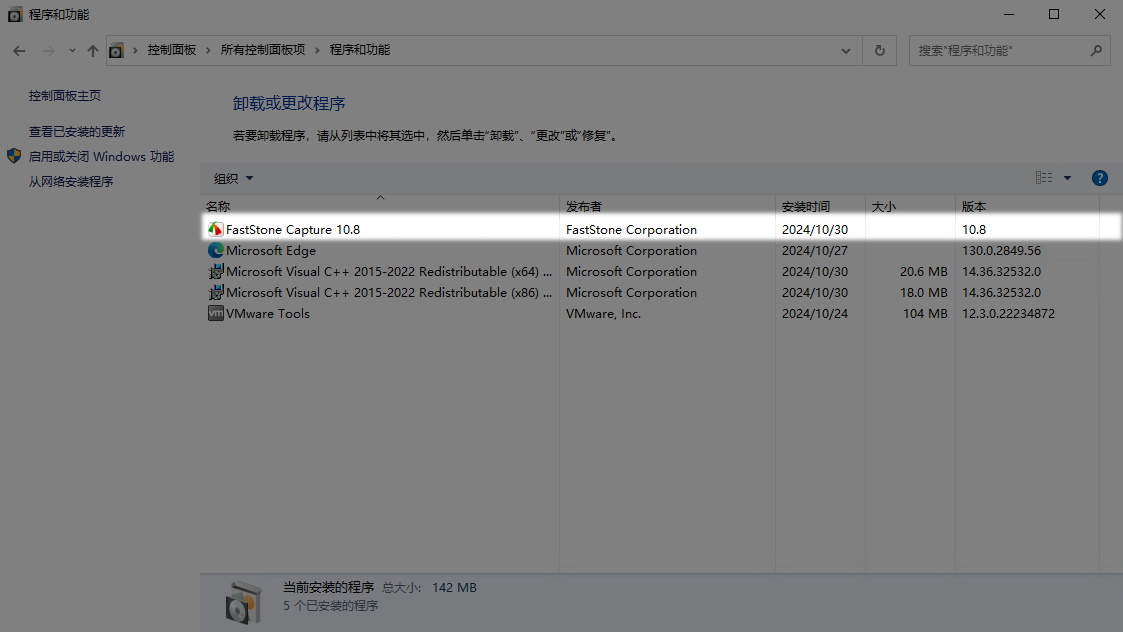
下载完成后,Playbook 会使用静默安装的方式来安装软件,这样用户就不会看到安装过程的界面,整个过程显得更加顺畅。🔧🛠️
最后,Playbook 会清理安装文件,将下载的安装包删除,以保持系统的整洁。🗑️🌟
---
- name: Install FSCaptureSetup on Windows
  hosts: windows
  tasks:
    - name: Ensure C:temp directory exists
      win_file:
        path: C:temp
        state: directory

    - name: Check if C:temp directory exists
      win_stat:
        path: C:temp
      register: temp_dir

    - name: Debug C:temp directory status
      debug:
        msg: "C:\temp exists: {{ temp_dir.stat.exists }}"

    - name: Download the FSCaptureSetup package
      win_get_url:
        url: https://cdn-download.faststonecapture.cn/FSCaptureSetup.exe
        dest: C:tempFSCaptureSetup.exe

    - name: Ensure FSCaptureSetup is installed through win_package
      win_package:
        path: C:tempFSCaptureSetup.exe
        state: present
        arguments: '/S'

    - name: Clean up the installer
      win_file:
        path: C:tempFSCaptureSetup.exe
        state: absent
运行playbook
ansible-playbook -i inventory.ini install_FSCapture.yaml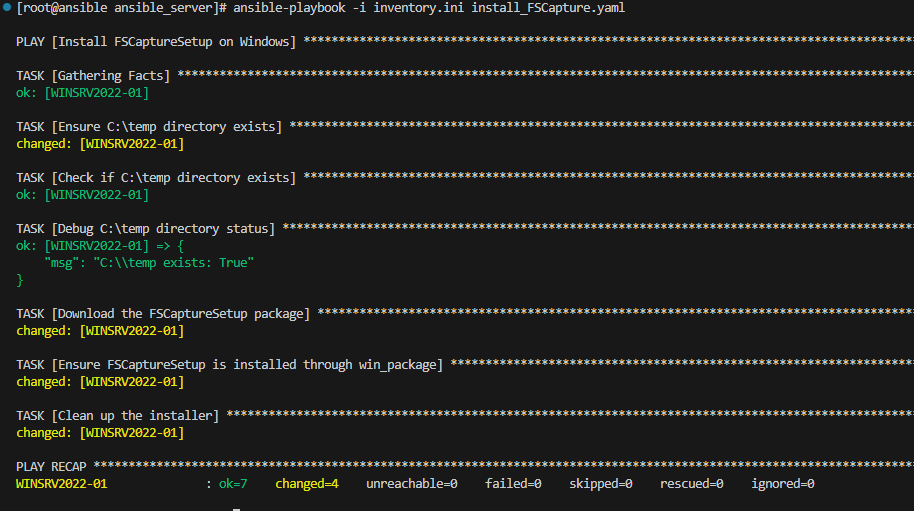

© 版权信息:
作者:PANGSHARE
发布平台:PANGSHARE | 文章链接:https://www.pangshare.com/windows%e8%bf%90%e7%bb%b4%e8%87%aa%e5%8a%a8%e5%8c%96%ef%bc%9aansible%e6%8e%a8%e9%80%81%e8%bd%af%e4%bb%b6%e5%ae%89%e8%a3%85-fscapture/
本文内容仅限非商业性使用,如需商用(包括但不限于广告投放、付费专栏、企业宣传等),请邮件联系原作者获得独家授权,违者将依法追究法律责任。
 微信扫一扫
微信扫一扫 
